Lead source

WordPress Offline Conversion Tracking

One plugin to track them all. LeadTrackr's WordPress plugin auto-detects your form plugins and captures every submission with full ad attribution, then pushes qualified conversions back to Google Ads, Meta, and GA4.

Start Free
yoursite.com/kitchen-quote
WordPress/kitchen-quote
NameJane de Vries
Emailjane@acme.com
Phone+31 6 12 34 56 78
Get a quote
Captured with the lead
gclid: Cj0KCQ…campaign = kitchen-nlutm_source = google

What it does

What Is WordPress Offline Conversion Tracking?

WordPress offline conversion tracking is the process of capturing form submissions on a WordPress website and connecting each one to the ad campaign, keyword, and traffic source that generated the visit. WordPress powers over 40 percent of all websites, and most WordPress lead generation relies on form plugins like Gravity Forms, Contact Form 7, Elementor Forms, or WPForms.

While these plugins handle form display and submission, none of them natively track which ad clicks produced those submissions. LeadTrackr's WordPress plugin solves this by automatically detecting supported form plugins, capturing every submission with complete attribution data including GCLID, fbclid, and UTM parameters, and providing a centralized dashboard where you can qualify leads and send offline conversion events to Google Ads, Meta, and GA4.
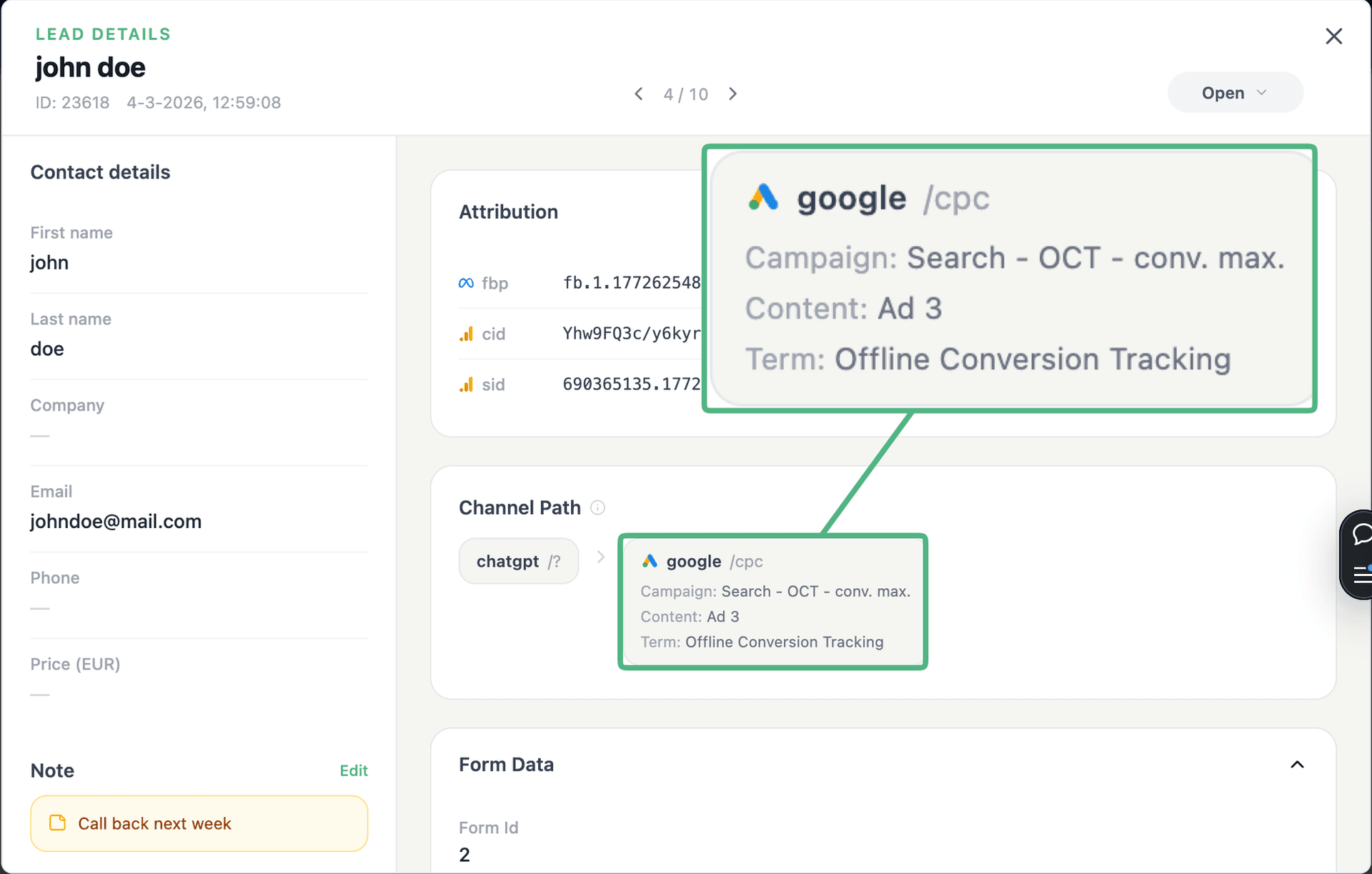
app.leadtrackr.io/project/myproject
LeadTrackr lead detail showing the full attribution and journey behind a single form submission

See the full customer journey of every form lead

The moment a form is submitted, LeadTrackr captures the lead with full attribution — the campaign, ad, keyword and landing page behind it. Qualify it with one click and follow the whole path, from the first ad click to the closed deal.

  • Every lead tied to its campaign, ad & keyword
  • One-click qualification, synced back to your ad platforms
  • The full path from form fill to closed deal

How it works

Setup in 3 Steps

01

Install & Connect

Install the LeadTrackr WordPress plugin, activate it, and connect it to your LeadTrackr account with a single API key.
02

Select Forms to Track

The plugin auto-detects all supported form plugins. Select which forms you want to track and map form fields to lead properties.
03

Start Qualifying Leads

Submissions flow into your LeadTrackr dashboard with full attribution. Qualify leads and push conversion events to Google Ads, Meta, and GA4.

Get started free

Start tracking real conversions with WordPress

Connect it in minutes — no developer needed.

Start Free

5-min setup · cancel anytime

FAQ

Frequently asked questions

LeadTrackr currently supports Gravity Forms, Contact Form 7, Elementor Pro Forms, and WPForms. These four plugins cover the vast majority of WordPress form implementations. The plugin auto-detects which form plugins are active on your site and presents them in the settings panel. Support for additional form plugins is added based on user demand. If you use a form plugin not currently listed, contact our support team to request it, and we will evaluate adding support in a future release.
No. The single LeadTrackr WordPress plugin handles all supported form builders. You do not need separate integrations or plugins for each form type. The plugin detects which form builders are active on your WordPress installation and enables tracking for each one from a unified settings page. If you use multiple form plugins on the same site, for example Gravity Forms for complex forms and Contact Form 7 for simple contact forms, the LeadTrackr plugin tracks both simultaneously.
The LeadTrackr WordPress plugin has minimal impact on website performance. The server-side component hooks into form submission events and adds no JavaScript to your frontend pages. The client-side attribution script is a lightweight snippet under 3 KB that loads asynchronously and does not block page rendering. It captures click IDs and UTM parameters from the URL and stores them in a first-party cookie. Independent performance testing shows no measurable impact on Core Web Vitals scores including LCP, FID, and CLS.
Yes. The LeadTrackr plugin is fully compatible with popular WordPress caching plugins including WP Rocket, W3 Total Cache, LiteSpeed Cache, and WP Super Cache. The attribution script uses first-party cookies to store visitor data, which is not affected by page caching. Form submissions are captured server-side when the form is submitted, so cached pages do not interfere with data capture. No special cache exclusion rules are needed for LeadTrackr to function correctly.
We recommend using one connection method per site to avoid duplicate lead submissions. If you are running WordPress, the plugin is the simplest option and requires no GTM configuration. The GTM integration is designed for non-WordPress sites like Webflow, Squarespace, or custom-built websites. If you have a WordPress site and also want to track forms from embedded third-party tools like Typeform, you can use the WordPress plugin for your native forms and GTM for the third-party embeds.

Get started free

Connect WordPress with LeadTrackr

Set up WordPress in minutes — no developer needed.

Start Free

5-min setup · cancel anytime