Lead source

Elementor Forms Conversion Tracking

Track every Elementor Pro form submission with complete attribution data. LeadTrackr's WordPress plugin auto-detects your page builder forms and captures leads with the campaign, keyword, and source that drove each visit.

Start Free
yoursite.com/kitchen-quote
Elementor Pro Forms/kitchen-quote
NameJane de Vries
Emailjane@acme.com
Phone+31 6 12 34 56 78
Get a quote
Captured with the lead
gclid: Cj0KCQ…campaign = kitchen-nlutm_source = google

What it does

What Is Elementor Forms Conversion Tracking?

Elementor Forms conversion tracking is the process of capturing form submissions made through the Elementor Pro Form widget and connecting each submission to the advertising campaign that generated the visit. Elementor is the most popular WordPress page builder, and its Pro version includes a built-in form widget that lets designers create forms directly within their page layouts.

While Elementor stores submissions in WordPress, it does not track which ad campaigns, keywords, or traffic sources generated those submissions. LeadTrackr adds this missing attribution layer by automatically detecting Elementor forms, capturing submissions with full source data including GCLID, fbclid, and UTM parameters, and enabling you to qualify leads and push conversion events to Google Ads, Meta, and GA4 without leaving your dashboard.
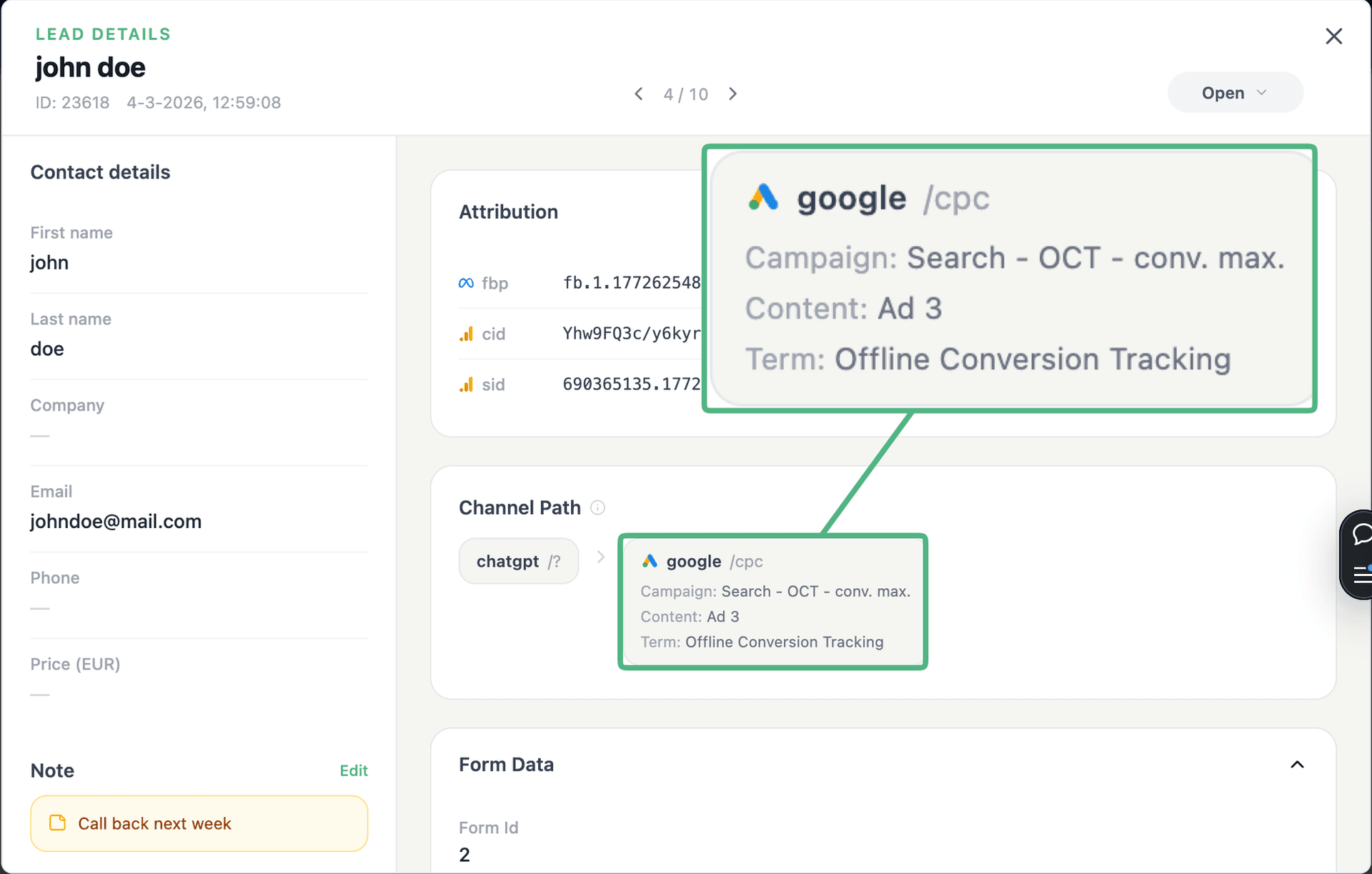
app.leadtrackr.io/project/myproject
LeadTrackr lead detail showing the full attribution and journey behind a single form submission

See the full customer journey of every form lead

The moment a form is submitted, LeadTrackr captures the lead with full attribution — the campaign, ad, keyword and landing page behind it. Qualify it with one click and follow the whole path, from the first ad click to the closed deal.

  • Every lead tied to its campaign, ad & keyword
  • One-click qualification, synced back to your ad platforms
  • The full path from form fill to closed deal

Plug & play

Send leads from any source

Post leads from any system, form or backend — full flexibility, full attribution.

How it works

Setup in 4 Steps

01

Install the Plugin

Add the LeadTrackr WordPress plugin and connect it to your account. Works with Elementor Pro form widgets out of the box.
02

Select Elementor Forms

The plugin auto-detects all Elementor Pro form widgets across your pages. Select which forms you want to track.
03

Map Form Fields

Map your Elementor form fields (name, email, phone, message) to LeadTrackr lead fields for accurate data capture.
04

Start Tracking

Form submissions flow into your LeadTrackr dashboard with full attribution. Qualify leads and push conversions to ad platforms.

Get started free

Start tracking real conversions with Elementor Pro Forms

Connect it in minutes — no developer needed.

Start Free

5-min setup · cancel anytime

FAQ

Frequently asked questions

LeadTrackr works with Elementor Pro form widgets, which are only available in the paid version of Elementor. The free version of Elementor does not include a form widget. If you use a third-party form plugin (like Contact Form 7 or WPForms) within Elementor Free layouts, LeadTrackr can still track those forms through their respective integrations. The LeadTrackr plugin detects the form type automatically, regardless of which page builder renders the page.
LeadTrackr captures form submissions from Elementor popup forms the same way it handles forms on regular pages. Elementor popups use the same form widget and submit via the same AJAX endpoint. The LeadTrackr plugin hooks into this server-side endpoint, so popup-based submissions are tracked with identical attribution data. Whether the form is on a page, in a popup, or embedded via a template, LeadTrackr captures the submission with the original visitor session attribution.
No. LeadTrackr does not modify or replace any Elementor form actions. Your existing email notifications, webhook integrations, redirect rules, and third-party actions continue to function exactly as configured. The LeadTrackr plugin adds an additional server-side hook that runs alongside the existing Elementor form actions. It captures submission data in parallel without modifying the form submission flow or any of your configured actions.
Yes. LeadTrackr detects and tracks Elementor form widgets regardless of where they appear, whether in page templates, global widgets, theme builder templates, or popup templates. Each form is identified by its Elementor form ID and tracked independently. This means you can have different forms for different purposes (contact, quote request, newsletter signup) and track them all separately in your LeadTrackr dashboard with distinct lead categories.
Yes. LeadTrackr captures all field data from Elementor form submissions, including custom fields, hidden fields, and acceptance fields. During the field mapping step, you assign your Elementor fields to the corresponding LeadTrackr lead properties. Any fields that do not have a direct mapping are stored as custom metadata on the lead record. This ensures that no data is lost, even if you use unique field types specific to your business workflow.

Get started free

Connect Elementor Pro Forms with LeadTrackr

Set up Elementor Pro Forms in minutes — no developer needed.

Start Free

5-min setup · cancel anytime