Lead source

Gravity Forms Conversion Tracking

Turn every Gravity Forms submission into trackable lead data. LeadTrackr's WordPress plugin auto-detects your forms and captures submissions with full attribution, no code required.

Start Free
yoursite.com/kitchen-quote
Gravity Forms/kitchen-quote
NameJane de Vries
Emailjane@acme.com
Phone+31 6 12 34 56 78
Get a quote
Captured with the lead
gclid: Cj0KCQ…campaign = kitchen-nlutm_source = google

What it does

What Is Gravity Forms Conversion Tracking?

Gravity Forms conversion tracking is the process of capturing every form submission made through Gravity Forms on your WordPress website and connecting it to the advertising campaign, keyword, and landing page that brought the visitor. Gravity Forms is one of the most popular premium WordPress form plugins, used by businesses for contact forms, quote requests, and lead generation.

While Gravity Forms stores submission data in WordPress, it does not natively track where those submissions came from or report back to ad platforms. LeadTrackr bridges this gap by automatically detecting your Gravity Forms, capturing submissions with full attribution data including GCLID and fbclid, and enabling you to send qualified lead events to Google Ads, Meta, and GA4 without writing a single line of code.
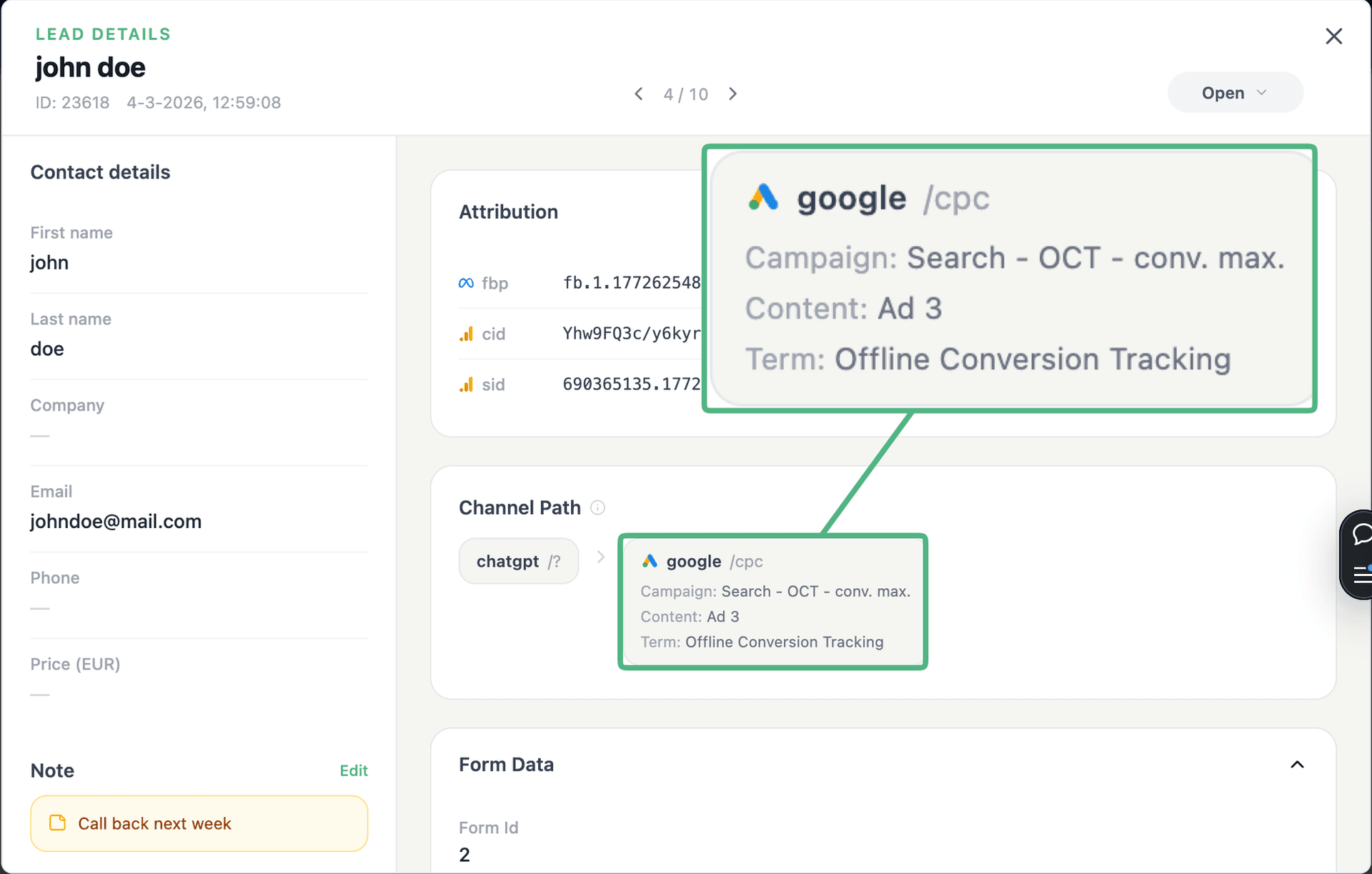
app.leadtrackr.io/project/myproject
LeadTrackr lead detail showing the full attribution and journey behind a single form submission

See the full customer journey of every form lead

The moment a form is submitted, LeadTrackr captures the lead with full attribution — the campaign, ad, keyword and landing page behind it. Qualify it with one click and follow the whole path, from the first ad click to the closed deal.

  • Every lead tied to its campaign, ad & keyword
  • One-click qualification, synced back to your ad platforms
  • The full path from form fill to closed deal

Plug & play

Send leads from any source

Post leads from any system, form or backend — full flexibility, full attribution.

How it works

Setup in 4 Steps

01

Install the Plugin

Add the LeadTrackr WordPress plugin from your dashboard. Activate and connect to your LeadTrackr account.
02

Select Gravity Forms

The plugin auto-detects all Gravity Forms on your site. Select which forms to track.
03

Map Form Fields

Map your form fields (name, email, phone) to LeadTrackr's lead fields for accurate data capture.
04

Start Tracking

Form submissions now flow into your LeadTrackr dashboard with full journey attribution.

Get started free

Start tracking real conversions with Gravity Forms

Connect it in minutes — no developer needed.

Start Free

5-min setup · cancel anytime

FAQ

Frequently asked questions

No. The LeadTrackr plugin works with your forms exactly as they are. It intercepts submissions silently, so your visitors will not notice any difference and your existing form notifications continue to work normally. The plugin hooks into Gravity Forms' native submission process at the server level, so there are no frontend changes, no additional JavaScript, and no impact on form loading speed or user experience.
Yes. LeadTrackr captures the final form submission data regardless of which add-ons you use. Conditional logic, multi-step forms, file upload fields, and custom field types are all supported. The plugin reads the processed submission data after all Gravity Forms hooks have fired, so add-ons that modify field values, validate inputs, or trigger additional actions will not interfere with LeadTrackr's data capture.
Yes. You can track as many forms as you want. Select which forms to track in the plugin settings: contact forms, quote request forms, demo request forms, and any other form type. Each form is tracked independently with its own submission count and attribution data. You can also assign different lead categories to different forms, making it easy to segment leads by form type in your LeadTrackr dashboard.
Yes. LeadTrackr fully supports both standard page-reload submissions and AJAX-powered submissions in Gravity Forms. When AJAX is enabled, form submissions happen without a full page refresh. The LeadTrackr plugin captures these submissions at the server level via the gform_after_submission hook, so the submission method does not affect data capture. Attribution data including UTM parameters, GCLID, and fbclid is captured regardless of how the form submits.
LeadTrackr works with all Gravity Forms license tiers, including Basic, Pro, and Elite. There are no specific add-ons or license levels required. The LeadTrackr plugin uses standard Gravity Forms hooks that are available in every version. If you are using Gravity Forms Lite or an older version, the plugin will still function as long as the core submission hooks are present. We recommend keeping Gravity Forms updated to the latest stable version for best compatibility.

Get started free

Connect Gravity Forms with LeadTrackr

Set up Gravity Forms in minutes — no developer needed.

Start Free

5-min setup · cancel anytime