Lead source

Typeform Offline Conversion Tracking

Track leads from your Typeform conversational forms with complete ad attribution. LeadTrackr connects via Google Tag Manager to capture submissions and push qualified conversions back to your ad platforms.

Start Free
yoursite.com/kitchen-quote
Typeform/kitchen-quote
NameJane de Vries
Emailjane@acme.com
Phone+31 6 12 34 56 78
Get a quote
Captured with the lead
gclid: Cj0KCQ…campaign = kitchen-nlutm_source = google

What it does

What Is Typeform Offline Conversion Tracking?

Typeform offline conversion tracking is the process of capturing form submissions from Typeform conversational forms and attributing each one to the ad campaign that drove the original website visit. Typeform is known for its engaging, one-question-at-a-time interface that achieves higher completion rates than traditional forms. However, Typeform runs in an embedded iframe or on a separate Typeform domain, which creates challenges for standard analytics tracking.

LeadTrackr solves this by using Google Tag Manager to listen for Typeform postMessage events that fire when a form is completed. Combined with the LeadTrackr attribution script that captures click identifiers and UTM parameters on page load, you get full ad attribution for every Typeform submission without modifying the form itself.
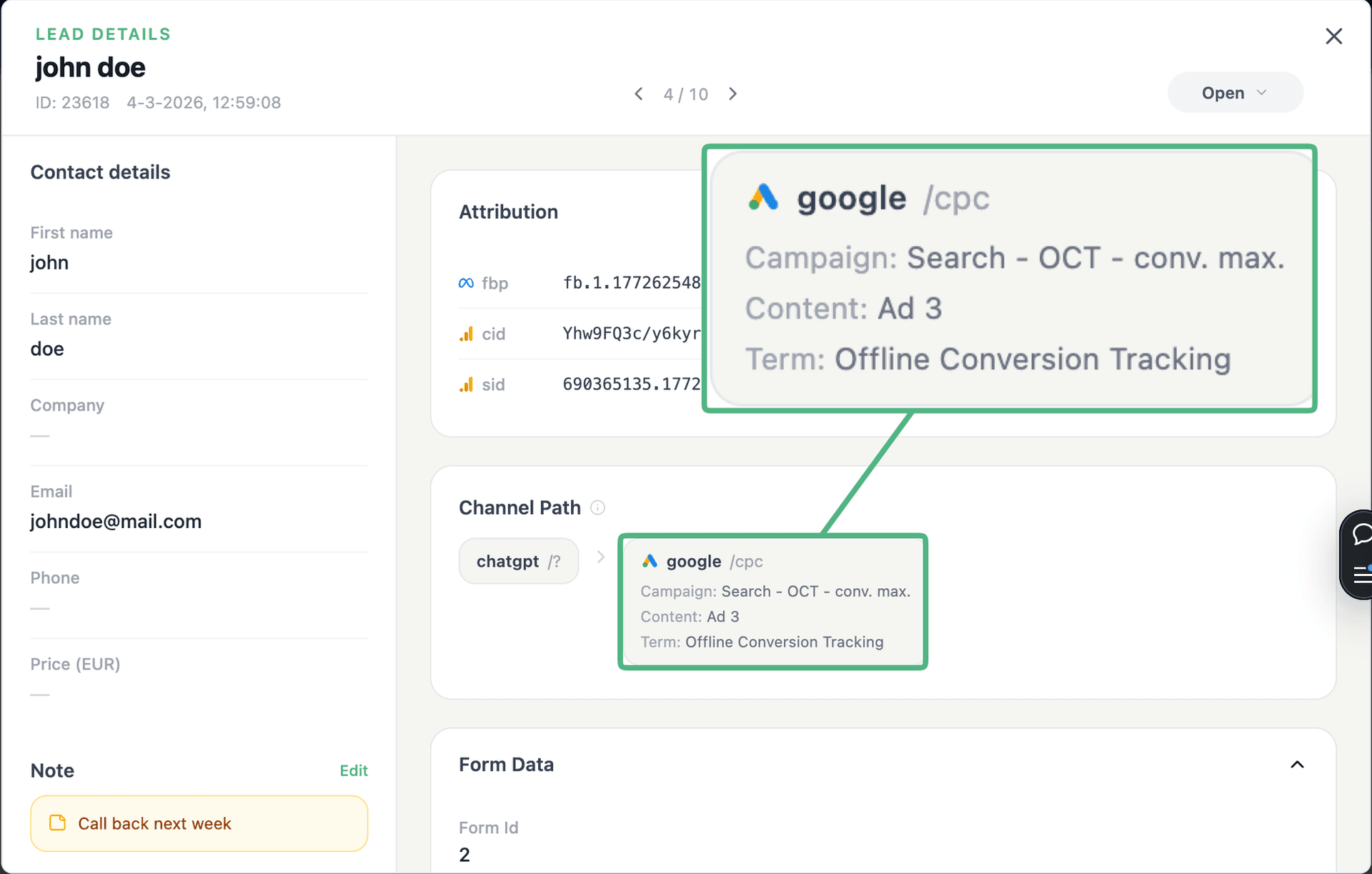
app.leadtrackr.io/project/myproject
LeadTrackr lead detail showing the full attribution and journey behind a single form submission

See the full customer journey of every form lead

The moment a form is submitted, LeadTrackr captures the lead with full attribution — the campaign, ad, keyword and landing page behind it. Qualify it with one click and follow the whole path, from the first ad click to the closed deal.

  • Every lead tied to its campaign, ad & keyword
  • One-click qualification, synced back to your ad platforms
  • The full path from form fill to closed deal

Plug & play

Send leads from any source

Post leads from any system, form or backend — full flexibility, full attribution.

How it works

Setup in 4 Steps

01

Add GTM to Your Site

Add the Google Tag Manager container code to your website where Typeform is embedded, whether on WordPress, Webflow, or custom HTML.
02

Import LeadTrackr Tag

Import the LeadTrackr tag template from the GTM Community Template Gallery and configure it with your account ID.
03

Configure Typeform Trigger

Set up a custom event trigger in GTM that listens for Typeform postMessage events. LeadTrackr provides a pre-built configuration for this.
04

Publish & Verify

Publish your GTM container and complete a test Typeform submission. Verify it appears in your LeadTrackr dashboard with attribution data.

Get started free

Start tracking real conversions with Typeform

Connect it in minutes — no developer needed.

Start Free

5-min setup · cancel anytime

FAQ

Frequently asked questions

Typeform embeds communicate with the parent page using the browser's postMessage API. When a respondent completes a Typeform, the embed sends a "form-submit" message to the parent window. LeadTrackr's GTM tag includes an event listener that detects this specific postMessage event. When triggered, it captures the completion timestamp and associates it with the attribution data already stored from the visitor's initial page load. This detection method is reliable and does not require modifying the Typeform itself.
Yes. LeadTrackr detects submissions from both embedded Typeforms (inline on the page) and popup Typeforms (triggered by a button click). Both embed types use the same postMessage API to communicate with the parent page. The only requirement is that GTM is loaded on the page where the Typeform is displayed. For full-page Typeform links that navigate the user away from your site, attribution data is passed via hidden fields using URL parameters, which LeadTrackr can configure automatically.
Yes. Typeform supports hidden fields that can be populated via URL parameters in the embed code. LeadTrackr can automatically append attribution data such as UTM parameters, GCLID, and fbclid as hidden fields in your Typeform embed URL. This means the attribution data is stored directly within the Typeform response, in addition to being captured by LeadTrackr. This dual-capture approach provides redundancy and allows you to see attribution data in Typeform results as well.
LeadTrackr captures the form completion event and associates it with the visitor session attribution data, including ad source, campaign name, keyword, GCLID, fbclid, UTM parameters, landing page URL, and referrer. The actual form response data (answers to questions) is retrieved via the Typeform Responses API using a webhook integration. LeadTrackr maps the response fields to lead properties so your dashboard shows both the attribution data and the form answers in a single lead record.
Yes. Since LeadTrackr uses event listeners rather than page-load-based tracking, it works correctly on single-page applications where Typeforms may be loaded dynamically. The GTM tag initializes the postMessage listener when it fires, and this listener persists throughout the page session. Whether the Typeform loads on initial page render or is triggered later via a route change or user interaction, the listener captures the submission event correctly.

Get started free

Connect Typeform with LeadTrackr

Set up Typeform in minutes — no developer needed.

Start Free

5-min setup · cancel anytime