Lead source

Kartra Offline Conversion Tracking

Turn Kartra opt-ins and checkouts into real conversion signals. LeadTrackr captures Kartra leads with full attribution and pushes qualified conversions to Facebook (Meta) via the Conversions API and to Google Ads.

Start Free
yoursite.com/kitchen-quote
Kartra/kitchen-quote
NameJane de Vries
Emailjane@acme.com
Phone+31 6 12 34 56 78
Get a quote
Captured with the lead
gclid: Cj0KCQ…campaign = kitchen-nlutm_source = google

What it does

What Is Kartra Offline Conversion Tracking?

Kartra offline conversion tracking is the process of connecting leads captured in Kartra — the all-in-one funnel and page builder — to the advertising campaign that produced them, and sending real sales outcomes back to Facebook (Meta) and Google Ads. Kartra’s built-in analytics show opt-ins and sales inside the funnel, but they do not send offline conversion events to ad platforms, so Meta and Google keep optimizing on clicks and form fills alone.

LeadTrackr closes that loop: it captures the click identifiers (fbclid, GCLID) when a visitor lands on your Kartra pages via Google Tag Manager, ties them to the Kartra lead, and pushes qualified or purchased conversions back through the Meta Conversions API and Google’s Enhanced Conversions for Leads. The result: Facebook and Google optimize your funnel traffic on buyers, not just opt-ins.
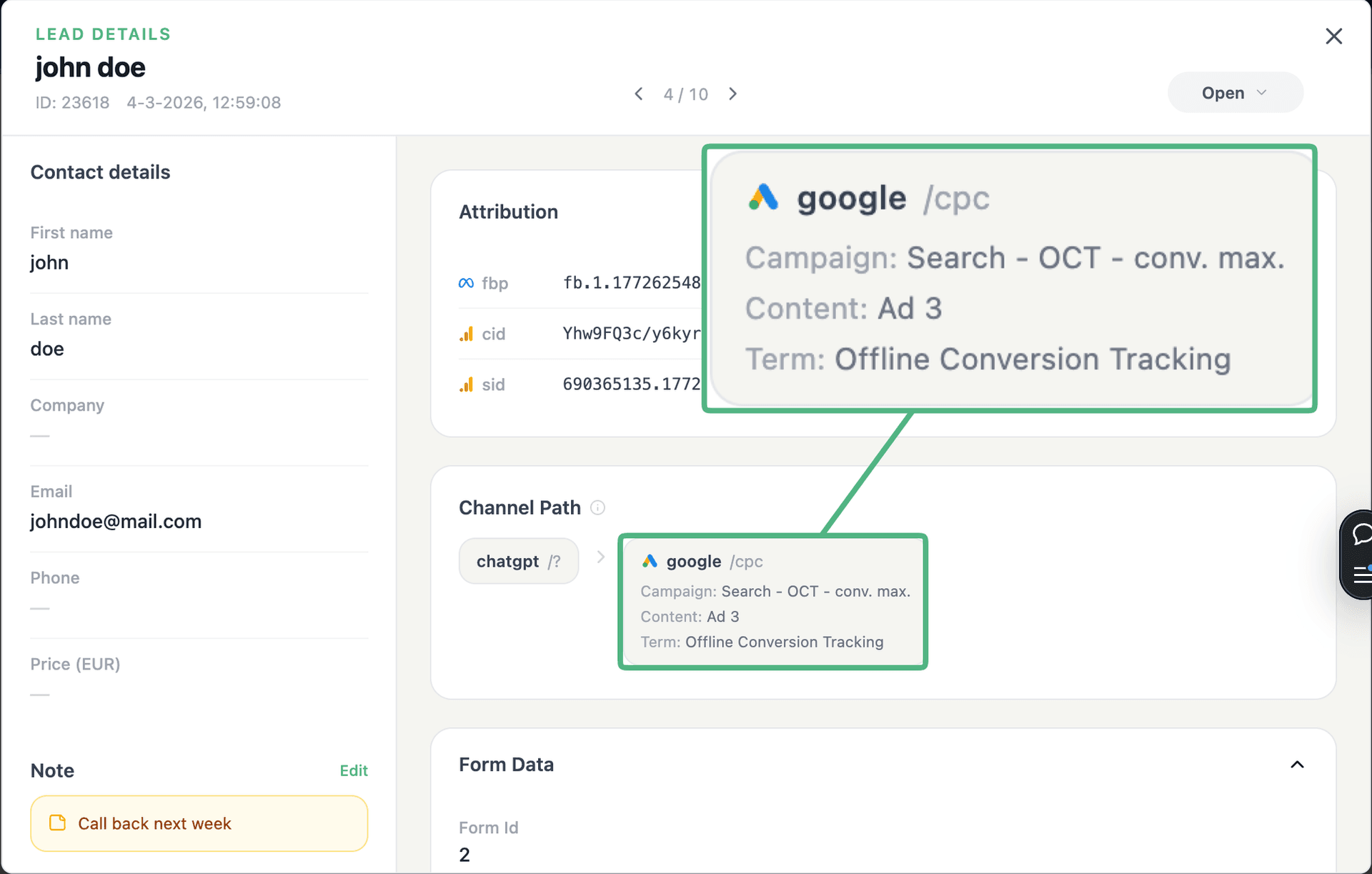
app.leadtrackr.io/project/myproject
LeadTrackr lead detail showing the full attribution and journey behind a single form submission

See the full customer journey of every form lead

The moment a form is submitted, LeadTrackr captures the lead with full attribution — the campaign, ad, keyword and landing page behind it. Qualify it with one click and follow the whole path, from the first ad click to the closed deal.

  • Every lead tied to its campaign, ad & keyword
  • One-click qualification, synced back to your ad platforms
  • The full path from form fill to closed deal

Plug & play

Send leads from any source

Post leads from any system, form or backend — full flexibility, full attribution.

How it works

Setup in 4 Steps

01

Add GTM to Kartra

Paste your Google Tag Manager container snippet into Kartra’s tracking-code settings so it loads on your funnel pages.
02

Install the LeadTrackr template

Add the LeadTrackr tag template in GTM. It captures form submissions and click identifiers (fbclid, GCLID) automatically.
03

Qualify Your Leads

Kartra leads appear in your LeadTrackr dashboard with full attribution. Mark real buyers as qualified or converted — manually or via your CRM.
04

Push Conversions to Meta & Google

LeadTrackr sends the qualified conversions to Facebook via the Conversions API and to Google Ads via Enhanced Conversions for Leads.

Get started free

Start tracking real conversions with Kartra

Connect it in minutes — no developer needed.

Start Free

5-min setup · cancel anytime

FAQ

Frequently asked questions

Two routes. The no-code route: add Google Tag Manager to your Kartra pages and install the LeadTrackr template — submissions are captured with the fbclid and pushed to Meta via the Conversions API once qualified. The webhook route: use Kartra’s outbound API/webhooks to POST new leads to the LeadTrackr REST API, which stores the attribution and sends the offline conversions to Meta. Both end in the same place: Facebook optimizing your campaigns on real buyers from your Kartra funnels.
Yes. Any Kartra page that loads your GTM container is covered — opt-in forms, order forms, and checkout pages. Checkout completions can be sent as purchase conversions with their order value, so Meta and Google optimize toward actual revenue from your funnels rather than top-of-funnel opt-ins.
Yes. The same captured leads are pushed to Google Ads via Enhanced Conversions for Leads, using the GCLID or hashed email and phone for matching. You can send different conversion actions for qualified leads and closed sales, each with its own value, enabling Smart Bidding on your real funnel economics.
No. Pasting the GTM snippet into Kartra’s tracking settings and adding the LeadTrackr template in Google Tag Manager are both copy-paste steps. If you prefer the webhook route via Kartra’s API, that is a configuration task in Kartra’s automation settings — still no custom development.
Yes. If you would rather not run GTM on your Kartra pages, configure Kartra to send new leads to the LeadTrackr REST API via its outbound webhooks. Pass the lead details plus any attribution you have (click IDs, UTM parameters), and LeadTrackr handles qualification and the conversion uploads to Meta and Google exactly as it does for GTM-captured leads.

Get started free

Connect Kartra with LeadTrackr

Set up Kartra in minutes — no developer needed.

Start Free

5-min setup · cancel anytime