Lead source

Jotform Offline Conversion Tracking

Track leads from your Jotform forms with complete ad attribution. LeadTrackr connects via Google Tag Manager to capture iframe-based submissions and push qualified conversions back to your ad platforms.

Start Free
yoursite.com/kitchen-quote
Jotform/kitchen-quote
NameJane de Vries
Emailjane@acme.com
Phone+31 6 12 34 56 78
Get a quote
Captured with the lead
gclid: Cj0KCQ…campaign = kitchen-nlutm_source = google

What it does

What Is Jotform Offline Conversion Tracking?

Jotform offline conversion tracking is the process of capturing form submissions from Jotform and connecting each submission to the advertising campaign that drove the website visit. Jotform is a widely used online form builder with an extensive template library, offering over ten thousand pre-built templates for every industry. Jotform typically embeds forms via iframe on your website, which creates a cross-origin tracking challenge for traditional analytics tools.

LeadTrackr overcomes this by using Google Tag Manager to listen for Jotform iframe submission events and postMessage signals. Combined with the attribution data captured on page load, LeadTrackr provides full ad attribution for every Jotform submission, enabling you to qualify leads in a centralized dashboard and push conversion events to Google Ads, Meta, and GA4.
app.leadtrackr.io/project/myproject
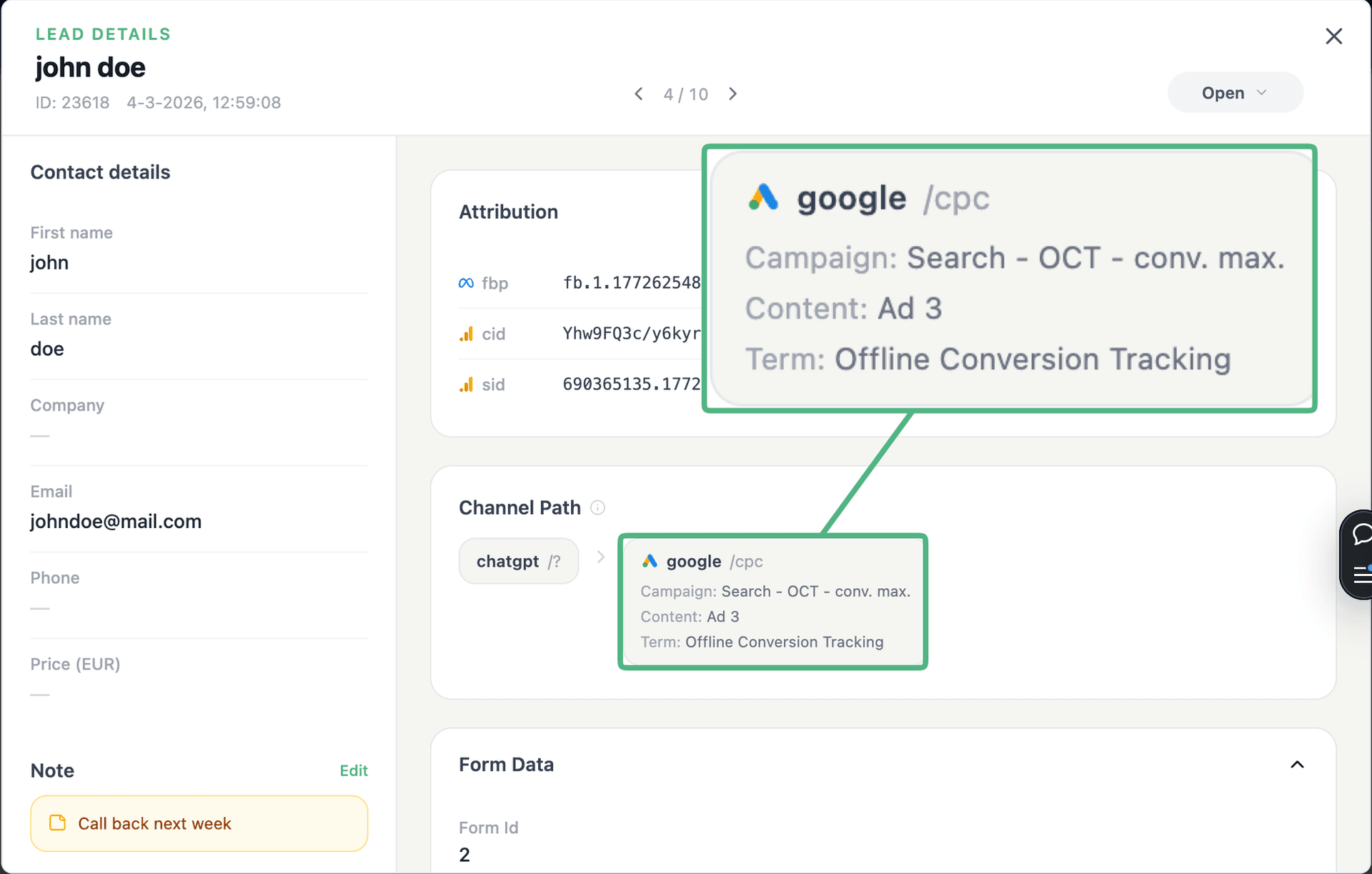
LeadTrackr lead detail showing the full attribution and journey behind a single form submission

See the full customer journey of every form lead

The moment a form is submitted, LeadTrackr captures the lead with full attribution — the campaign, ad, keyword and landing page behind it. Qualify it with one click and follow the whole path, from the first ad click to the closed deal.

  • Every lead tied to its campaign, ad & keyword
  • One-click qualification, synced back to your ad platforms
  • The full path from form fill to closed deal

Plug & play

Send leads from any source

Post leads from any system, form or backend — full flexibility, full attribution.

How it works

Setup in 4 Steps

01

Add GTM to Your Site

Add the Google Tag Manager container code to your website where Jotform forms are embedded.
02

Import LeadTrackr Tag

Import the LeadTrackr tag template from the GTM Community Template Gallery and enter your account credentials.
03

Configure Jotform Trigger

Set up a custom event trigger in GTM for Jotform iframe submission events. LeadTrackr provides pre-built trigger configurations for Jotform.
04

Publish & Verify

Publish your GTM container and submit a test form. Check your LeadTrackr dashboard to confirm the submission appears with full attribution.

Get started free

Start tracking real conversions with Jotform

Connect it in minutes — no developer needed.

Start Free

5-min setup · cancel anytime

FAQ

Frequently asked questions

Jotform embedded forms run inside iframes on your website. When a form is submitted, Jotform sends a postMessage event to the parent page and may also change the iframe URL to a thank-you page. LeadTrackr's GTM tag listens for both of these signals to reliably detect form completions. The detection works across all Jotform embed methods including the standard iframe embed, the lightbox popup, and the full-page embed. No modifications to the Jotform itself are required.
Yes. LeadTrackr retrieves form response data via the Jotform API using a webhook that fires on each submission. When a Jotform submission is detected on your website, LeadTrackr matches the submission event with the API response using timestamps and form identifiers. The form field data (name, email, phone, and any custom fields) is then stored in your LeadTrackr dashboard alongside the attribution data captured from the visitor session on your website.
Yes. LeadTrackr captures submissions from Jotform payment forms just like regular forms. The payment processing happens within the Jotform iframe, and the completion event is sent to the parent page after payment is confirmed. LeadTrackr detects this completion event and captures the submission with full attribution data. If you need to track payment amounts as conversion values, you can configure LeadTrackr to pull the payment value from the Jotform API response.
LeadTrackr tracks Jotform submissions across all pages where GTM is installed. Each form submission is attributed to the specific page and session where it occurred, with full UTM parameter and click ID tracking. You can embed different Jotform forms on different landing pages, and each will be tracked independently with its own attribution data. The LeadTrackr dashboard shows which page each submission came from, making it easy to compare conversion rates across landing pages.
Yes. LeadTrackr supports both client-side and server-side Google Tag Manager for Jotform tracking. With server-side GTM, the LeadTrackr tag runs on your server-side container, which provides benefits like reduced client-side JavaScript, improved page load speed, and enhanced data accuracy. The Jotform submission detection still happens client-side via the postMessage listener, but the data is routed through your server-side GTM endpoint before being sent to LeadTrackr.

Get started free

Connect Jotform with LeadTrackr

Set up Jotform in minutes — no developer needed.

Start Free

5-min setup · cancel anytime