Lead source

Calendly Offline Conversion Tracking

A booked meeting is not a customer. LeadTrackr captures every Calendly booking with full attribution via Google Tag Manager and pushes only the meetings that actually show up and close back to Google Ads and Meta.

Start Free
yoursite.com/kitchen-quote
Calendly/kitchen-quote
NameJane de Vries
Emailjane@acme.com
Phone+31 6 12 34 56 78
Get a quote
Captured with the lead
gclid: Cj0KCQ…campaign = kitchen-nlutm_source = google

What it does

What Is Calendly Conversion Tracking?

Calendly conversion tracking is the practice of tying every meeting booked through Calendly back to the ad click that produced it, and then reporting the real outcome of that meeting — showed up, qualified, closed — to the ad platform that paid for the click. Calendly runs on its own domain or inside an embed, which is exactly where attribution normally breaks: the click identifiers (GCLID, fbclid) live on your landing page, while the booking is confirmed somewhere your ad platform never sees. The result is a conversion count made of bookings, including the no-shows, the tyre-kickers and the wrong-fit calls.

LeadTrackr closes that gap through Google Tag Manager: the LeadTrackr tag listens for the Calendly booking event, reads the click identifiers that were captured when the visitor first landed, and stores the booking as a lead with its full campaign, ad and keyword attribution. When that meeting turns into a real opportunity, LeadTrackr sends the conversion back to Google Ads via Enhanced Conversions for Leads and to Meta via the Conversions API — so bidding optimises on meetings that become customers, not on calendar slots.
app.leadtrackr.io/project/myproject
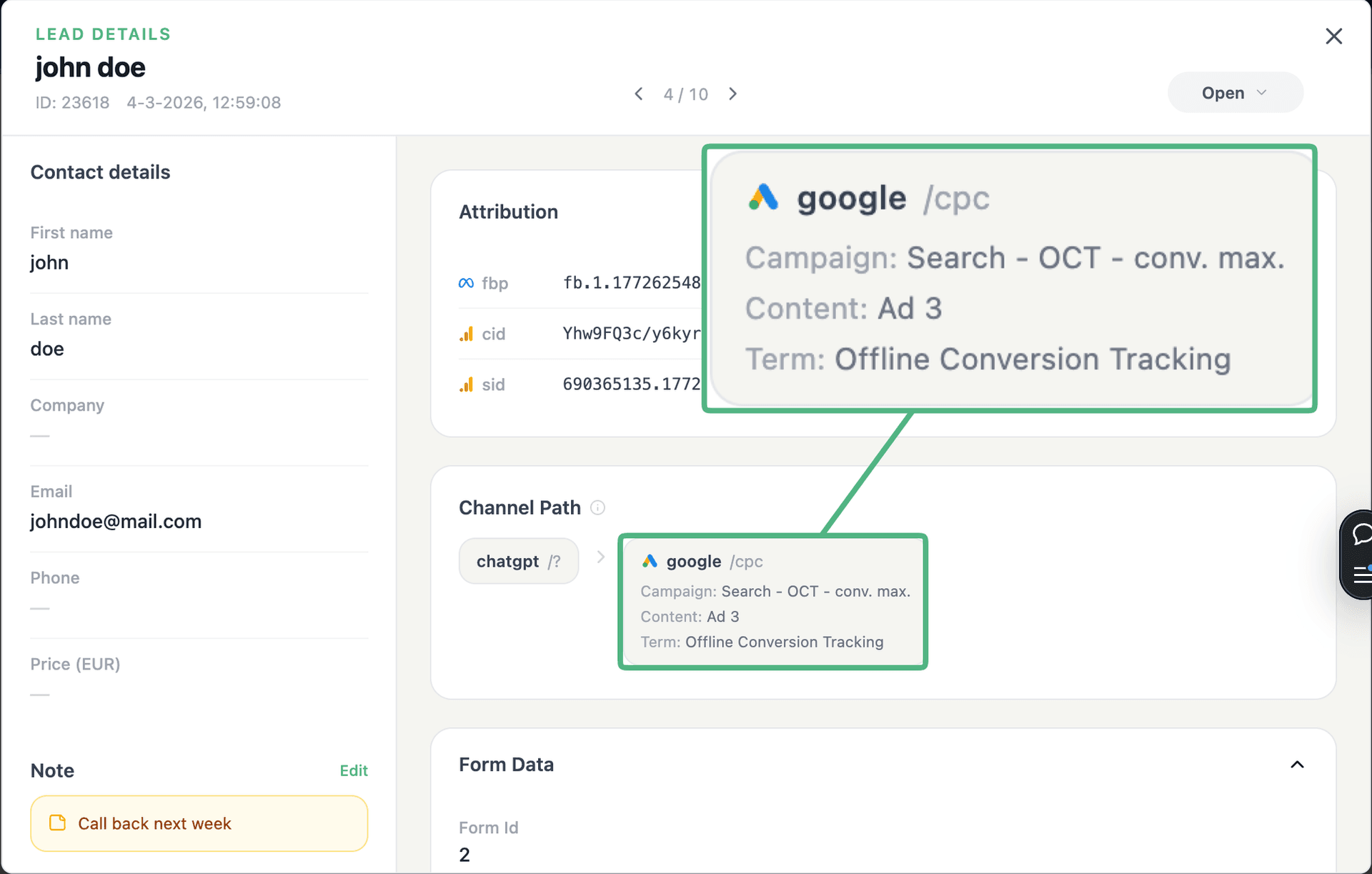
LeadTrackr lead detail showing the full attribution and journey behind a single form submission

See the full customer journey of every form lead

The moment a form is submitted, LeadTrackr captures the lead with full attribution — the campaign, ad, keyword and landing page behind it. Qualify it with one click and follow the whole path, from the first ad click to the closed deal.

  • Every lead tied to its campaign, ad & keyword
  • One-click qualification, synced back to your ad platforms
  • The full path from form fill to closed deal

How it works

Setup in 4 Steps

01

Add GTM to your booking page

Make sure your Google Tag Manager container loads on the page that hosts the Calendly embed or the page that links out to your Calendly scheduling link.
02

Install the LeadTrackr template

Add the LeadTrackr tag template in GTM and switch on the Calendly listener. It picks up the booking event and the click identifiers (GCLID, fbclid) automatically — no code.
03

Qualify the meetings that matter

Every booking lands in your LeadTrackr dashboard with its campaign, ad and keyword. Mark the meetings that showed up and became real opportunities — manually or straight from your CRM.
04

Push conversions to Google & Meta

LeadTrackr sends the qualified bookings to Google Ads via Enhanced Conversions for Leads and to Meta via the Conversions API, attributed to the original click.

Get started free

Start tracking real conversions with Calendly

Connect it in minutes — no developer needed.

Start Free

5-min setup · cancel anytime

FAQ

Frequently asked questions

Add Google Tag Manager to the page that hosts your Calendly embed or scheduling link, then install the LeadTrackr tag template and enable the Calendly listener. The tag captures the booking together with the GCLID that was stored when the visitor first landed on your site. The booking appears in LeadTrackr as a lead with full attribution, and once you mark it as qualified, LeadTrackr uploads the conversion to Google Ads via Enhanced Conversions for Leads — attributed back to the original click date, so your campaign history stays accurate.
Both. An inline or popup embed broadcasts its booking event to the parent page, so the LeadTrackr GTM tag can read it directly on your own site where the click identifiers already live. If you send visitors to a calendly.com scheduling link instead, LeadTrackr passes the attribution through so the booking still resolves to the right click. Either route ends with the same fully attributed lead in your dashboard.
Because a booking is a promise, not a sale. Between 20 and 40 percent of inbound meetings never happen, and a share of the ones that do are wrong-fit from the first minute. If you feed every booking to Smart Bidding as a conversion, the algorithm learns to buy calendar slots — including the cheap, low-intent ones. Sending only the meetings that showed up and became real opportunities gives bidding a signal that tracks your pipeline instead of your calendar.
Yes. LeadTrackr supports multiple conversion actions with their own values, so you can send a small value when a meeting is booked, a larger one when it actually happens, and the real deal value when it closes. That is what enables value-based bidding — Target ROAS and Maximize Conversion Value — on the outcome you actually care about rather than on raw booking volume.
No. Everything happens in Google Tag Manager: import the LeadTrackr template, switch on the Calendly listener, and publish the container. There is no code to write on your website and nothing to configure inside Calendly itself. If your CRM already tracks whether a meeting happened, connecting that CRM to LeadTrackr means the qualification step runs automatically too.
Partly, and that is by design. Click-identifier matching depends on consent, so a visitor who refuses marketing cookies will not carry a GCLID or fbclid. LeadTrackr still records the booking, and Google Ads can match it through Enhanced Conversions for Leads on the hashed email address the invitee entered in Calendly. You lose some match rate, not the whole lead.

Get started free

Connect Calendly with LeadTrackr

Set up Calendly in minutes — no developer needed.

Start Free

5-min setup · cancel anytime