
How to Name Your GA4 Offline Conversion Events
This guide explains which event names to use, how to map your CRM stages onto them, and which parameters to send.

The short answer
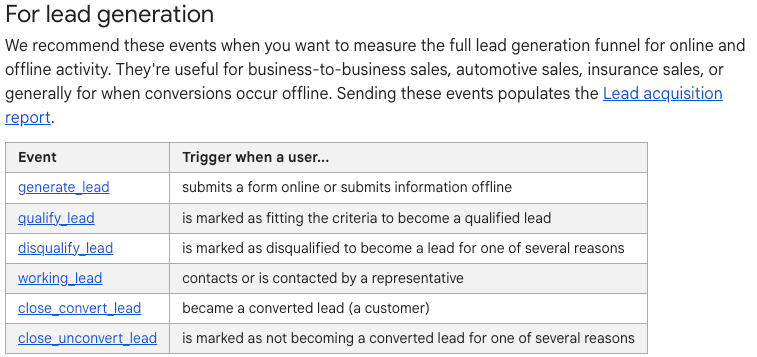
If you send offline lead events to GA4, use Google's recommended event names: generate_lead, qualify_lead, working_lead, disqualify_lead, close_convert_lead and close_unconvert_lead. GA4's built-in lead reports only recognise those names, and historical events cannot be renamed later.
How GA4 reads event names
GA4 stores every incoming hit as an event: a name plus a set of parameters. When your CRM sends a closed deal through the Measurement Protocol, GA4 records the name it receives. That name determines whether GA4 includes the event in its built-in lead reports.
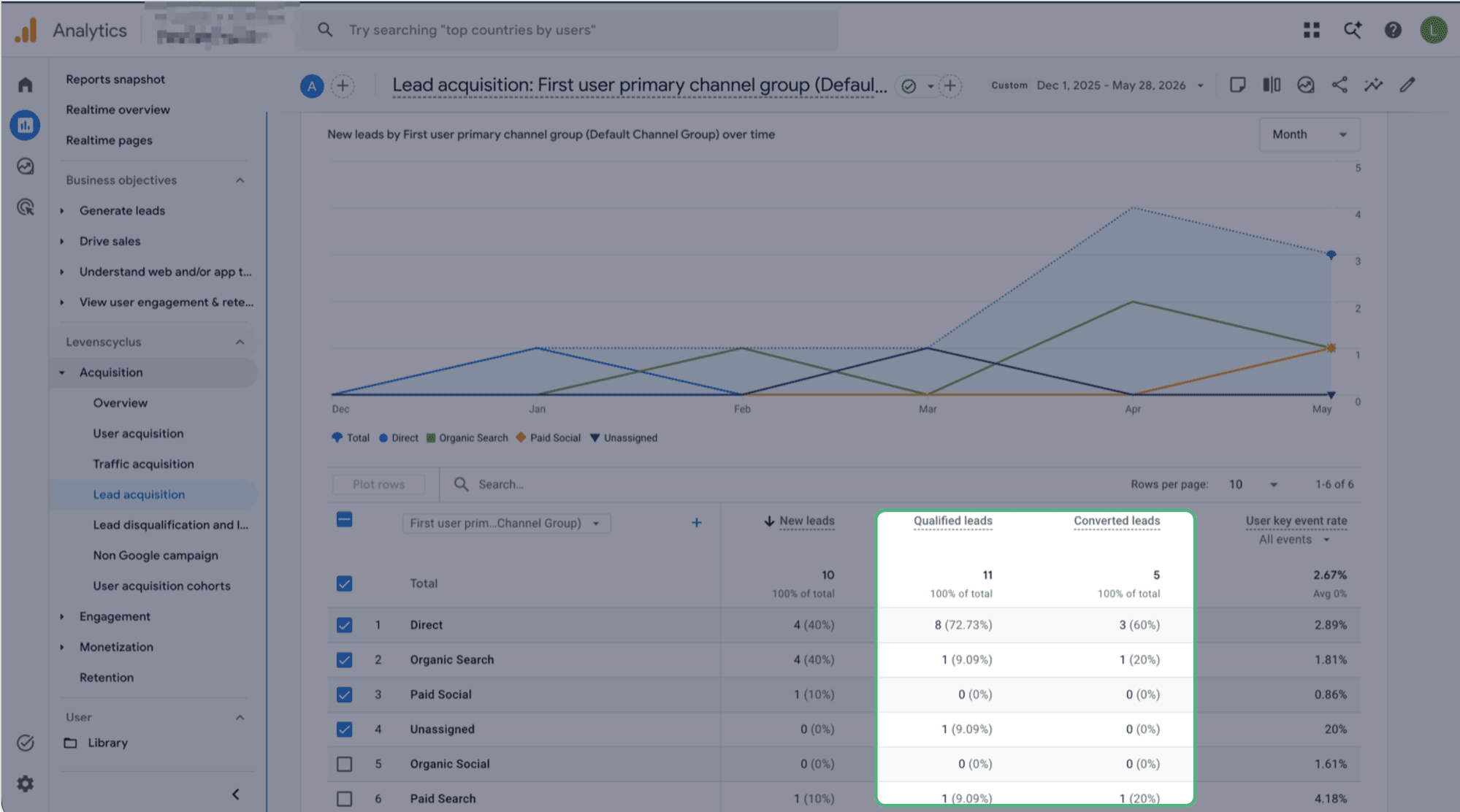
Matching is exact and case sensitive, so Qualify_Lead and qualify_lead are two separate events. A name like qualified_lead still collects data and shows up in Realtime and in Explorations, but the Lead acquisition report stays empty, which usually gets read as a broken report rather than a naming problem.
Settle the names before you send the first event. GA4 does not rename events that have already been collected, and a custom dimension registered today does not backfill earlier data.
The six lead events
Google defines six events for the lead generation lifecycle. Five of them are meant to be sent from your CRM after the fact. Only generate_lead normally fires on the website.
| Event name | Fire it when | Parameters Google defines |
|---|---|---|
generate_lead | Someone submits a form or gives you their details offline. |
|
qualify_lead | The lead is marked as fitting your qualification criteria. |
|
working_lead | A rep contacts the lead, or the lead contacts a rep. Fires more than once per lead as the deal moves. |
|
disqualify_lead | The lead is ruled out, for example wrong country, no budget, a competitor or a bot. |
|
close_convert_lead | The lead became a customer. This event carries the deal revenue. |
|
close_unconvert_lead | A lead that reached qualification was closed as lost. |
|
Sending these events populates two GA4 reports: the Lead acquisition report, which counts new, qualified and converted leads by source and campaign, and the Lead disqualification and loss report, which you add from the report library. Google's recommended events reference is the canonical list.
qualify_lead and close_convert_lead arrive under those exact names.Mapping your CRM stages
Most CRM pipelines have more stages than GA4 has lead events. The common mistake is to create a separate event name for every stage. Those events collect data, but they sit outside the built-in reports and the vocabulary grows until nobody is certain what each name means.
A workable rule is to give a stage its own event when it changes the state of the lead. Qualification, disqualification, won and lost all change the state. Booking a demo or sending a proposal are steps inside the sales process, so those go on working_lead with a different lead_status value.
| CRM stage | GA4 event | Parameters | Why |
|---|---|---|---|
| Form submitted on the site | generate_lead | lead_source | The website-side event. Everything below comes from the CRM. |
| First call attempted | working_lead | lead_status: "Contact attempted" | A step in the process, so no new event name. |
| Discovery call held | working_lead | lead_status: "Discovery held" | Same event, different status value. |
| Marked Sales Qualified | qualify_lead | currency, value | A state change, and the first signal worth bidding on. |
| Proposal sent | working_lead | lead_status: "Proposal sent" | Still a step, even though it feels significant. |
| Wrong fit or no budget | disqualify_lead | disqualified_lead_reason | Fire this instead of dropping the lead silently. |
| Deal won | close_convert_lead | currency, value | Send the real deal value here. |
| Deal lost | close_unconvert_lead | unconvert_lead_reason | Only for leads that reached qualification first. |
Three mapping mistakes account for most broken lead funnels.
1. Firing
qualify_leadmore than once per leadA lead that moves back and forth through your pipeline fires the event again on every entry into the stage. The Lead acquisition report counts events, so the qualified count inflates and the qualification rate can pass 100%.
Trigger on the first transition into the stage. Most CRMs can store a "qualified at" timestamp, so fire only when that field goes from empty to filled.
2. Using
close_unconvert_leadfor leads that were never qualifiedIf every dead record is closed as lost, the event stops meaning "we tried and it did not close" and starts meaning "this record is no longer open". Those are different questions.
Send
disqualify_leadfor leads that never reached qualification, and reserveclose_unconvert_leadfor the ones that did.3. Skipping
generate_leadbecause a form event already existsMany setups already send
form_submitor a custom event from GTM. The Lead acquisition report readsgenerate_leadspecifically, so marking an existing form event as a key event does not populate it.You can keep both. Send
generate_leadalongside whatever you already fire, and use the existing event for your own operational reporting.
How LeadTrackr handles the mapping
LeadTrackr maps each CRM stage to the correct GA4 event and to the matching Google Ads conversion action. You set the mapping once per conversion label and it applies to every lead after that, which keeps the naming consistent across accounts without a custom Measurement Protocol implementation for each one.
The GA4 integration covers the connection itself: measurement ID, API secret, and which stage sends which event.
Naming the parameter values
Consistent parameter values are just as important as the event names.
GA4 accepts any string up to 100 characters and does not normalise it. If your CRM sends Not looking to buy, not looking to buy and Not Looking To Buy, the report shows three rows for one reason.
Keep a closed list of values
Decide the permitted values for lead_status, disqualified_lead_reason and unconvert_lead_reason up front, write them down, and have the CRM offer them as a dropdown rather than a free text field. Five to ten values per parameter is usually enough.
A free text CRM field piped into GA4 causes the most trouble here. Every rep phrases it differently, cardinality rises, and GA4 starts grouping the long tail into (other).
Human-readable values, snake_case names
The Google examples set a reasonable convention: parameter names in lowercase with underscores, such as disqualified_lead_reason, and values written the way someone would say them, such as "Not looking to buy".
Which convention you pick matters less than applying it consistently, because a mixed convention produces duplicate rows that cannot be merged afterwards.
Send value only when you know it
On close_convert_lead, send the real deal value with a matching currency. GA4 requires currency whenever value is set, and a value without a currency is dropped from revenue reporting.
On generate_lead and qualify_lead, an estimated value is useful when your leads vary a lot in worth. A flat placeholder is worse than sending nothing, because it makes every campaign look equally profitable.
Register parameters as custom dimensions
A custom parameter arrives in GA4 but does not appear in standard reports until you register it as a custom dimension in Admin. Until then it exists only in the raw data and in BigQuery.
A standard property allows 50 event-scoped custom dimensions and a 360 property allows 125. Registration is not retroactive, so register the status and reason parameters when you go live rather than later.
GA4 naming limits
The GA4 constraints worth knowing before you settle on names.
- Event name length
- 40 characters. This matters most for key events, because GA4 appends
_cinternally and a name that then passes 40 characters is not reported as a key event. - Case sensitivity
qualify_leadandQualify_Leadare separate events. Keep everything lowercase.- Parameter name length
- 40 characters.
- Parameter value length
- 100 characters. Longer values are truncated without warning.
- Parameters per event
- 25. Rarely a constraint for lead events, but worth knowing before you attach a large CRM payload.
- Distinct event names
- Web data streams have no cap, so the discipline has to come from your own conventions.
- Custom dimensions
- 50 event-scoped on a standard property, 125 on a 360 property. Not retroactive.
Which events to mark as key events
Marking an event as a key event tells GA4 it is an outcome worth counting, and makes it available as a conversion in a linked Google Ads account.
Mark qualify_lead and close_convert_lead. Those two states carry commercial meaning: the lead was worth having, and the lead paid.
Think carefully before marking generate_lead. Most sites already count form submissions somewhere, and marking this event as well puts a form fill count back at the centre of your reporting. Leaving it unmarked keeps the qualified count as the headline number.
Leave working_lead unmarked. It fires repeatedly per lead by design, so as a key event it produces a number that rises without anything new happening.
Marking an event as a key event is not retroactive, but it is reversible. Unmark it and the historical data stays in place.
GA4 events and Google Ads conversions
Your GA4 event names and your Google Ads conversion action names are two separate naming schemes, and they do not have to match.
GA4 event names come from a fixed vocabulary you adopt so the built-in reports work. Google Ads conversion action names are free text, shown in the campaign interface and used in bid strategies. A descriptive conversion action name such as "Deal Won" or "Sales Qualified Lead" is easier for account managers to recognise and use than a snake_case event name.
Google Ads smart bidding reads the conversion category rather than the name, so set that to Qualified lead or Converted lead to match the stage. One CRM stage then produces one GA4 event and one Google Ads conversion action, each named for the people who read it. The GA4 integration sets both from the same conversion label, so the two stay in step.
A worked example
A closed deal sent from the CRM to GA4 through the Measurement Protocol. The client_id does the attribution work. It is the GA4 client ID captured on the website at form submission and stored on the lead record. Without it the event still arrives, but as an unattributed direct hit.
POST https://www.google-analytics.com/mp/collect
  ?measurement_id=G-XXXXXXXXXX
  &api_secret=<API_SECRET>

{
  "client_id": "1234567890.1587494389",
  "timestamp_micros": 1787921400000000,
  "non_personalized_ads": false,
  "events": [
    {
      "name": "close_convert_lead",
      "params": {
        "currency": "EUR",
        "value": 4800,
        "lead_source": "Google Ads"
      }
    }
  ]
}
Set timestamp_micros to the moment the deal closed rather than letting GA4 stamp the time it received the event, so a nightly sync still lands the event on the right day. GA4 accepts backdated events up to 72 hours old and discards the timestamp beyond that, which is a reason to sync daily rather than weekly.
FAQ
Frequently asked questions
LeadTrackr handles the CRM-to-GA4 mapping and sends each stage under the correct event name. Start a 30-day free trial and test it on your own campaigns.
Get started free
Try it on your own campaigns
LeadTrackr maps each CRM stage to the correct GA4 event and Google Ads conversion action, then sends it for every lead. 30-day free trial.
30 days free · Cancel anytime