> ## Documentation Index
> Fetch the complete documentation index at: https://leadtrackr.io/docs/llms.txt
> Use this file to discover all available pages before exploring further.
# How to Set Up the Meta (Facebook) Integration
> Send offline conversions from LeadTrackr to Meta (Facebook Ads) using the Conversions API (CAPI).
## Step 1: Open the Meta Integration Settings in LeadTrackr
1. Go to your **Project Settings**
2. Navigate to the **Meta Integration** tab
You'll see three fields you need to fill in:
* **Pixel ID**
* **Access Token**
* **Phone Number Country Code Fallback**
## Step 2: Find Your Meta Data Set ID
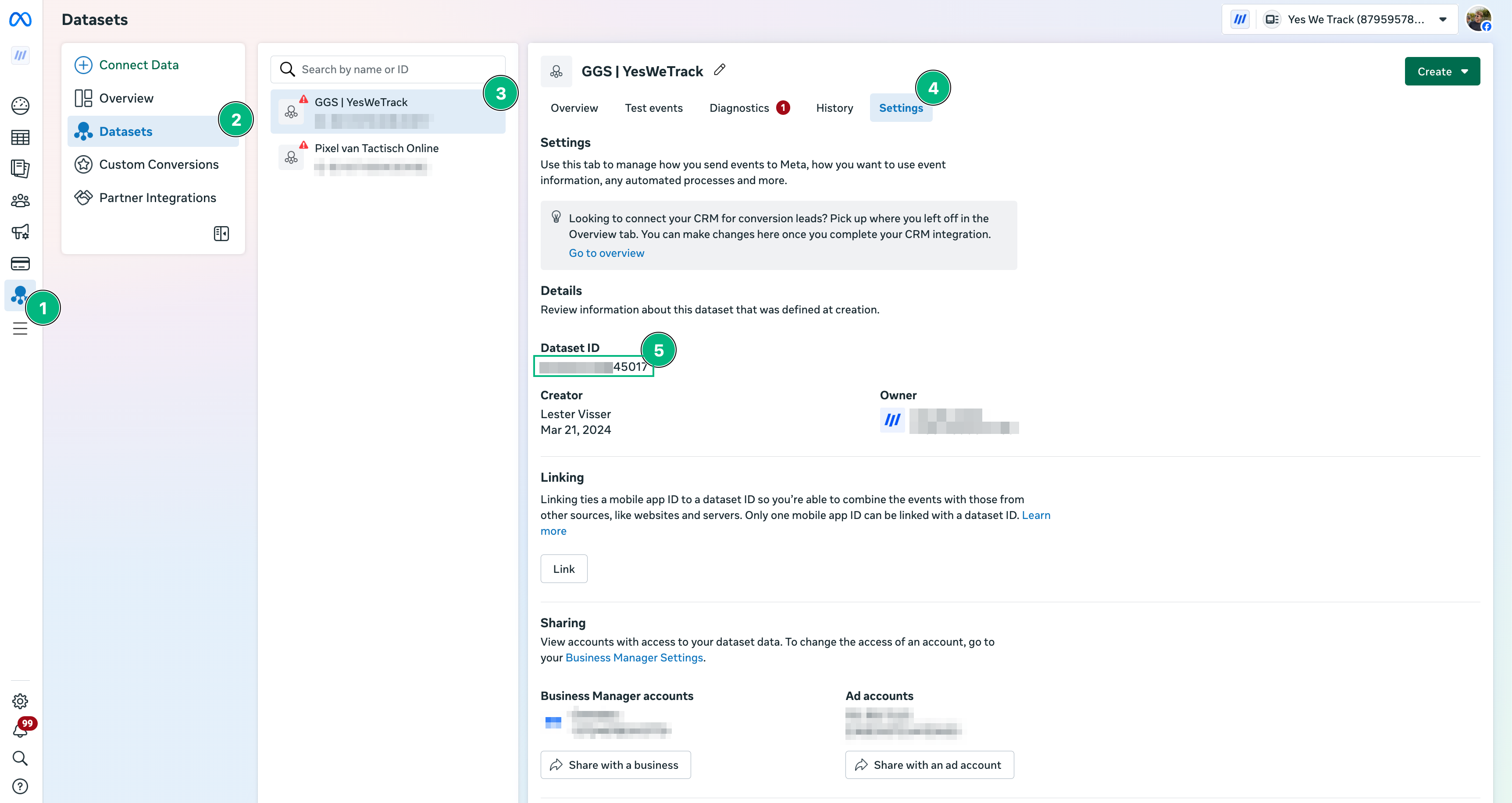
To find your **Pixel ID**:
1. Go to **Facebook Business Manager**
2. Navigate to: **Events Manager** → **Data Sources** → select your Pixel
3. Click on the **Settings** tab
4. Copy the **DataSet ID**
Paste this into the **Pixel ID** field in LeadTrackr.
 ## Step 3: Generate a Meta Access Token
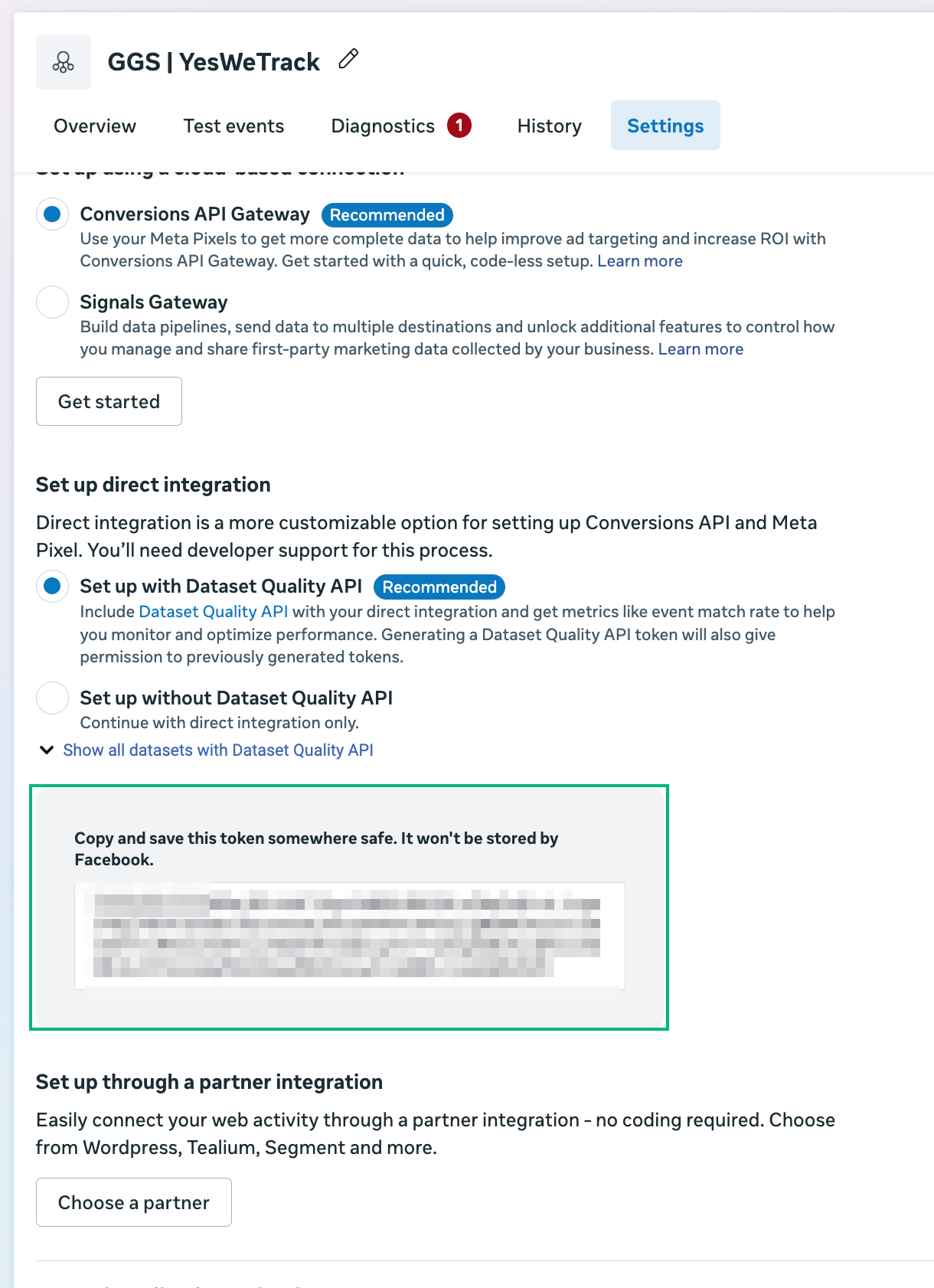
Meta uses access tokens to authorize offline conversion events sent via the Conversions API.
To generate your **Access Token**:
1. In **Events Manager**, in the same data set setting where you got your pixel ID
2. Under **Settings**, scroll down to the section called **Conversions API**
3. Click **Generate Access Token**
4. Copy the generated token
Paste this into the **Access Token** field in LeadTrackr.
## Step 3: Generate a Meta Access Token
Meta uses access tokens to authorize offline conversion events sent via the Conversions API.
To generate your **Access Token**:
1. In **Events Manager**, in the same data set setting where you got your pixel ID
2. Under **Settings**, scroll down to the section called **Conversions API**
3. Click **Generate Access Token**
4. Copy the generated token
Paste this into the **Access Token** field in LeadTrackr.
 ## Step 4: Add a Phone Number Country Code Fallback
Meta requires phone numbers to be sent in **international format** (e.g. +31, +1).
If a phone number in your lead data doesn't include a country code, LeadTrackr will automatically add the fallback code you set here.
**Example:** If most of your leads are Dutch, select `+31`.
## That's It!
Your Meta (Facebook) integration is now ready to send offline conversions via the Conversions API.
## What's Next?
Your Meta integration is ready — now link your lead statuses to Meta events using conversion labels.
Link your lead statuses to Meta conversion events
## Further Reading
* [Conversions API — Meta for Developers](https://developers.facebook.com/docs/marketing-api/conversions-api)
* [Offline Conversions — Meta Business Help Center](https://www.facebook.com/business/help/2041148702679993)
## Step 4: Add a Phone Number Country Code Fallback
Meta requires phone numbers to be sent in **international format** (e.g. +31, +1).
If a phone number in your lead data doesn't include a country code, LeadTrackr will automatically add the fallback code you set here.
**Example:** If most of your leads are Dutch, select `+31`.
## That's It!
Your Meta (Facebook) integration is now ready to send offline conversions via the Conversions API.
## What's Next?
Your Meta integration is ready — now link your lead statuses to Meta events using conversion labels.
Link your lead statuses to Meta conversion events
## Further Reading
* [Conversions API — Meta for Developers](https://developers.facebook.com/docs/marketing-api/conversions-api)
* [Offline Conversions — Meta Business Help Center](https://www.facebook.com/business/help/2041148702679993)